

Stacked panes
A stack is a layout slot that holds several panes and shows one at a time. Hidden members keep running with their scrollback, working directory, title and agent state, and a strip along the slot names them. Use a stack to keep an editor fixed in one slot while several agents take turns in another, without a column per agent or a copy of the editor in every tab.
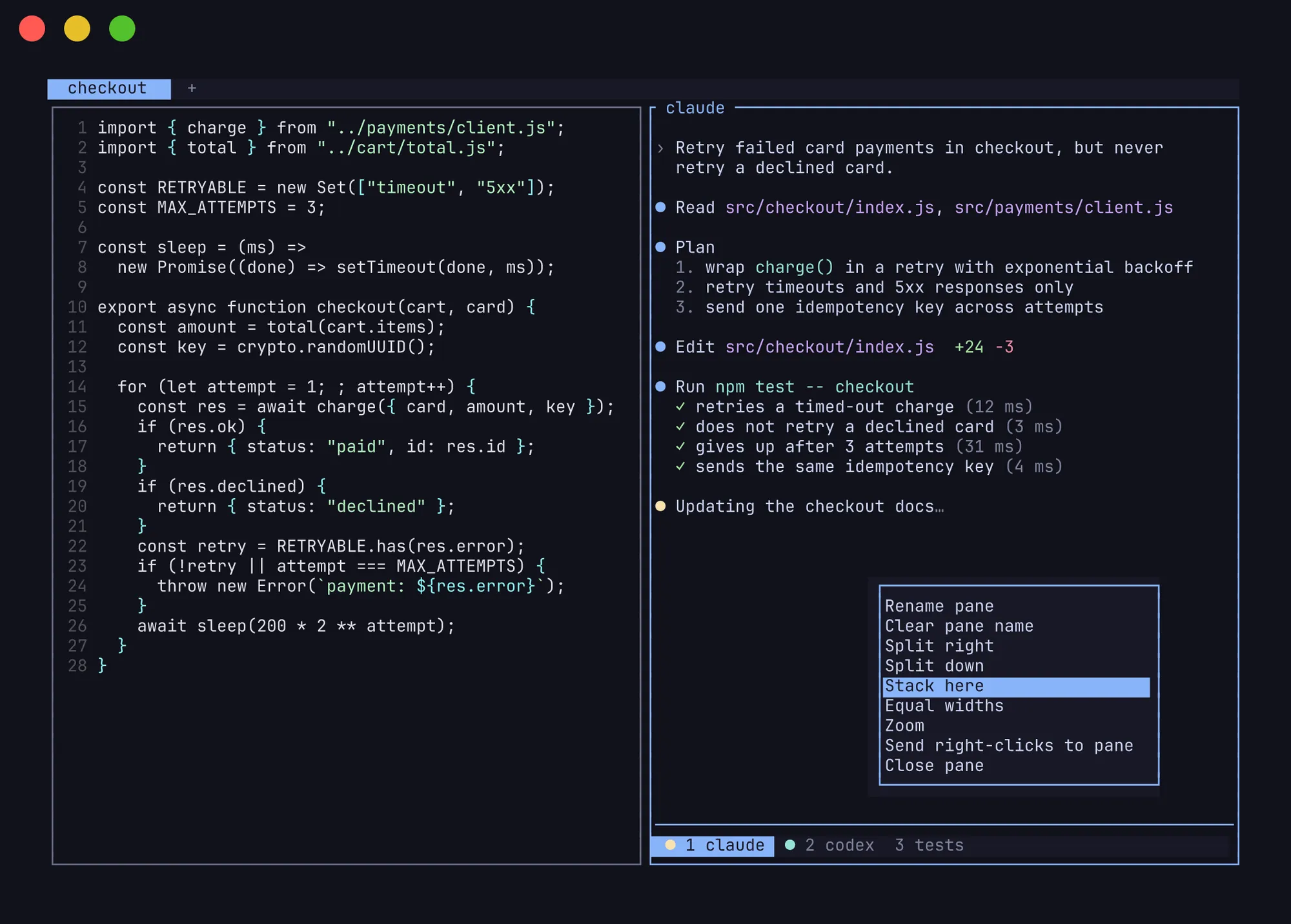
Stack keys are the tab keys with alt added:
| Action | Tabs | Stack members | Config key |
|---|---|---|---|
| Go to N | prefix+1..9 |
prefix+alt+1..9 |
keys.focus_stacked |
| Next, wrapping | prefix+n |
prefix+alt+n |
keys.next_stacked |
| Previous, wrapping | prefix+p |
prefix+alt+p |
keys.previous_stacked |
| New | prefix+c |
prefix+alt+c |
keys.stack_pane |
| Close | prefix+shift+x |
prefix+alt+x |
keys.close_stacked |
Right-clicking a pane and choosing Stack here opens a new member in that pane’s slot. Clicking a segment in the strip shows that member. close_stacked is the same action as close_pane (prefix+x), because the focused pane is always the visible member. Renaming a member with rename_pane (prefix+shift+p) changes its name in the strip.
The alt keys need your terminal to send Option as Alt. In Ghostty on macOS, set macos-option-as-alt = true.
The strip sits at the bottom of the slot, with a line between it and the content in the colour of the pane’s border. To move the strip to the top, or to drop the line and give its row back to the content:
[ui]stack_strip_position = "top"stack_strip_separator = falseFrom the CLI
Section titled “From the CLI”herdsman pane stack --current --no-focus # new hidden member behind the current paneherdsman pane stack w1:p3 --focus # new member in p3's slot, shown and focusedherdsman pane stacks # every stack: its members and the visible oneherdsman pane focus w1:p7 # focus a pane by ID, revealing it if hiddenherdsman pane focus-stacked --current next # step through a stack; also N or previousherdsman pane move w1:p4 --stack w1:p2 # an existing pane joins p2's stackpane stack takes --cwd, --env and --right-click like pane split. Without --focus, a new member starts hidden. Member numbers count from 1, as the strip shows them.
The prefix+g navigator lists hidden members too. It tags stacked rows stacked N/M and hidden ones hidden, so typing hidden filters to them.
layout.apply and layout.export accept and produce stacks:
{ "type": "stack", "active": 1, "panes": [{ "label": "claude" }, { "label": "codex" }] }The JSON API methods behind these commands are listed under Stacked panes in the socket API.
How stacks behave
Section titled “How stacks behave”- The focused pane is always visible. Every way of focusing a hidden member reveals it: sidebar clicks,
pane focus, cycling panes and restoring a session. - Members fill the whole slot. Splitting beside any member splits beside the whole stack, and directional focus sees only the visible member.
- A stack of one becomes a plain pane. Closing the visible member shows the next one, or the previous one when it was last.
- Hidden members keep their size. They are resized with the visible member, so switching never reflows them.
- Done means unseen. An agent that finishes in a hidden member reads
done, notidle, until you reveal it. - Zoom keeps the strip. Zooming a member fills the tab with it and its stack’s strip. Switching members, from the strip or with the keys, stays zoomed.